Skip to content
Case study · चव्हाण ब्रदर्स, लालबाग

Chavan Brothers: an 89-year-old masala house, rebuilt for online shoppers

How we audited a 40,000-line business platform, redesigned the online store and added 11 Indian languages, without changing a single rule in the live business.

1937Lalbaug · Mumbai
12business modules mapped, from shop billing to payroll
11languages on the new store, with Google Translate for the rest
0changes to the live pricing, checkout or payment logic
01 At a glance

A heritage spice brand with a full ERP behind its counter


Chavan Brothers grinds and sells masala from its shop in Lalbaug, Mumbai, and ships across India. Behind the shop is a custom Django platform that runs billing, custom grinding orders, barcode sales, purchasing, warehousing, delivery, payroll and the online store. JMDA Analytic was asked to understand that platform and give the online store a modern, multilingual front end, with no risk to day-to-day operations.

Client
Chavan Brothers (founded 1937 as Kamgar Masala), Shop No. 5, Shri Ganesh Nagar, Lalbaug, Mumbai 400012
Industry
Food retail and manufacturing: ground masala, chilli powders, whole spices, special blends, papad
Sales channels
Shop counter, custom grinding to order, online store with delivery across India, WhatsApp orders, bulk and B2B sales
Delivered by
JMDA Analytic Pvt Ltd, Mumbai
Services
Codebase audit and documentation · e-commerce UX redesign · multilingual front end · performance work · QA across devices · mobile app plan
Technology
Python / Django, PostgreSQL, Apache with mod_wsgi on Ubuntu, Django cron jobs, Worldline and Easebuzz payments, SMS and WhatsApp OTP
154database models across the platform
~40.6klines of Python reviewed (excluding migrations)
333HTML templates across staff and customer screens
8scheduled jobs: stock, invoices, attendance, salary, payments
6user roles, from customer to dispatch boy and barcode staff
110language and screen-size combinations tested on the new pages
02 The client

Three generations of “firsts” in Lalbaug


Chavan Brothers is one of Lalbaug's best-known masala shops. It began in 1937 as Kamgar Masala, beside the Digvijay Mill gate in Girangaon, and was named for the mill workers (kamgar) and office-goers whose kitchens it supplied.

The family has a habit of being first. Its taglines in Marathi are “स्वादिष्ट घरगुती मसाल्याचे माहेरघर” (the home of tasty homemade masala) and “विश्वास ग्राहकांचा आणि प्रदीर्घ अनुभव तब्बल तीन पिढ्यांचा” (customers' trust, and three generations of experience).

  1. 1937

    Late Vishnu Natha Chavan opens Kamgar Masala in Lalbaug, beside the Digvijay Mill gate and Western India Mill.

  2. 1965

    Brings electric iron pounders into Mumbai's masala trade, the first to do so, replacing foot-operated pounding. The shop becomes Chavan Brothers.

  3. 1990

    Present owner Shri Baban Vishnu Chavan becomes the first to remove chilli stalks before grinding, for a cleaner, tastier masala.

  4. Today

    The third generation keeps the recipes and ships across Maharashtra, India and abroad, backed by its own software platform.

What makes the business unusual

  • Made to order. Customers can bring their family recipe and have it ground in the shop. The software prices this by masala type plus labour.
  • Two worlds in one system. The same database serves a busy counter with barcode billing and a national online store.
  • Bilingual by nature. Products carry both English and Marathi names, and many customers prefer Marathi.
  • Own logistics. Local deliveries by the shop's dispatch staff, with courier dockets and follow-ups for the rest of India.

Who buys

  • Mumbai families who have used the shop for decades
  • Maharashtrians living elsewhere in India and abroad
  • Home cooks wanting regional blends: Goda, Malvani, Kolhapuri, Kanda Lasun
  • Bulk and business buyers
03 Discovery

The platform: 12 modules, one database


Our first job was to read the whole system and document it for the client. This is the module map we produced. Each box is a Django app; together they cover the business from purchase of raw spices to the customer's doorstep.

Customer-facingShop and salesBack office and operations
Online storenew_pages

Homepage, category and product pages, cart, address book, order history, policy pages and enquiry form.

Online ordersonline_product

Online cart, pack sizes, invoices, payment records and Worldline gateway responses.

Customers & loginuser

Accounts, OTP login by SMS and WhatsApp, addresses, states, pincodes, areas and warehouses.

Billing & custom grindinginvoice

Masala-type orders priced by pack size, labour charges, invoices, docket numbers, credit notes and sales reports.

Barcode counterbarcode_page

Barcode labels, scan-to-cart billing, daily summary, purchase entries, loose and pack returns.

Retail & categoriescategory_system

Category-based carts and retail invoices for counter and multi-masala orders.

ERP coreoffline_module

Item masters (raw, finished, third-party), vendors, customers, purchases, ledgers, expenses, warehouse moves, home production, couriers, monthly reports.

Stockinventory

Nightly stock snapshots for barcode packs, loose goods and shop stock, run by scheduled jobs.

Deliverydispatch_boy

Delivery records and reports for dispatch staff, and payment links for collecting money at the door.

Staff & payrollemployee_app

Labour documents, attendance, basic salary, increments, advances and payments.

Website & paymentspage

Earlier website pages and the job that checks pending online payments every two minutes.

TaxGSTNumber

GST registration details used on invoices.
Integrations

  • Worldline (Paynimo) payment gateway with automatic status checks
  • Easebuzz payment links for offline and delivery orders
  • OTP by SMS and WhatsApp
  • Email for enquiries and notifications

Scheduled jobs

  • 00:30 daily: stock snapshot, staff attendance
  • 1st of month: basic salary update
  • 18:35 daily: shop and loose stock, invoice finalisation, credit notes
  • Every 2 minutes: pending payment status
04 How an online order works

From product page to doorstep


  1. 1Browse

    Customer picks a product and a pack size (100 g, 250 g, 1 kg…). Prices are MRP.

  2. 2Log in with OTP

    Mobile number only. A code arrives by SMS and WhatsApp. No password.

  3. 3Address

    Saved billing and delivery address. The billing state sets the delivery rate.

  4. 4Cart

    Delivery is added by weight: ₹80 per kg in Maharashtra, ₹100 per kg elsewhere.

  5. 5Pay

    Secure Worldline payment page. A job re-checks pending payments every two minutes.

  6. 6Invoice

    The order becomes an invoice and is finalised by the evening job.

  7. 7Dispatch

    Courier docket number, or local delivery by the shop's dispatch staff.

  8. 8Follow-up

    Courier follow-ups, order history for the customer, monthly sales reports for the owner.

05 The challenge

A strong business held back by its storefront


  • Hard to shop on a phone. The old homepage read like a brochure. Products, prices and pack sizes were several taps away.
  • English only. Customers across India, and many loyal Marathi-speaking customers, had no option in their own language.
  • Slow on mobile data. Large pages and repeated database work made the store slow to appear.
  • A large, undocumented codebase. Several copies of the same views, and no written map of how billing, stock and online orders connect.
  • Zero tolerance for risk. The same system runs the shop counter, so pricing, checkout, payments and invoices could not be touched.
  • A clear brief from the owner: “Don't change anything. New look, same logic.”
The question we had to answer: how do you give an 89-year-old business a 2026 online store when you are not allowed to touch the engine?
06 Our approach

Build beside the live site, not on top of it


Instead of editing the live homepage, we built new “test” pages that sit next to it at their own addresses. They read the same database and call the same cart, login and enquiry code as the live site. The owner can try them on real phones, and the live site never changes until the business decides to switch.

Phase 1Audit

Read and document the whole platform

We traced every module, model and customer flow and wrote a codebase guide for the client: an app map, the order and payment flows, a diagram, and a prioritised list of 14 bugs and risks. Examples: duplicated copies of the same views in old folders, a delivery calculation that does not handle orders above 16 kg, and a fee row in the cart that can never apply.

Phase 2Design

Test two directions, then commit

We built a modern brand-led page (/test-home/) and a quick-commerce page (/test-quick/) in the style Indian shoppers know from Blinkit and similar apps. The owner chose quick-commerce. We then refined it in rounds: removed sections that didn't sell, checked every FAQ answer against how checkout actually works, and showed every product of every category with its price.

Phase 3Languages

Eleven languages, translated by hand

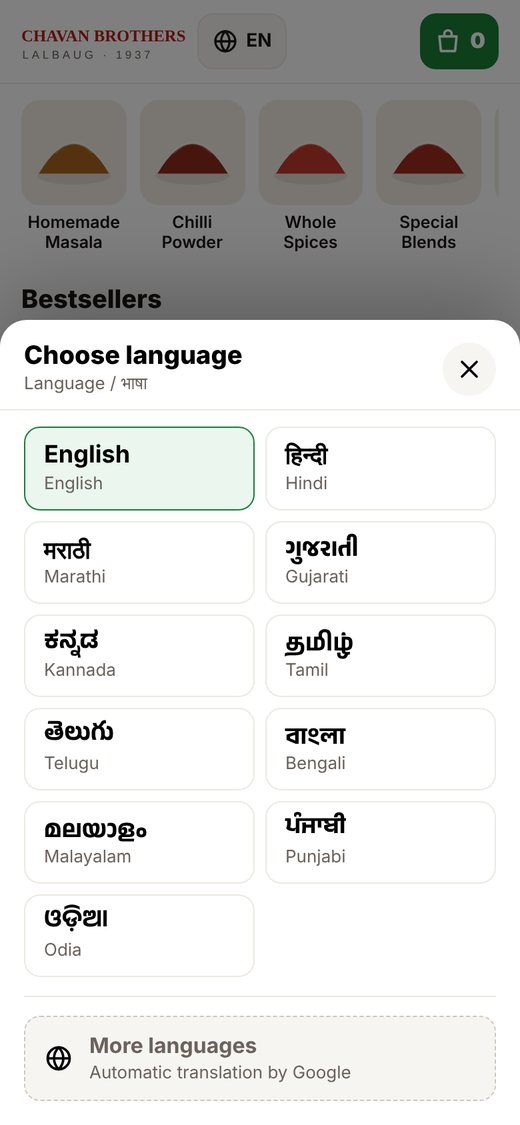
A language picker with English, Hindi, Marathi, Gujarati, Kannada, Tamil, Telugu, Bengali, Malayalam, Punjabi and Odia, plus Google Translate on demand for any other language.

Phase 4Speed & stability

Fix slow loading and make installs safe

We cut database work to a fixed handful of queries, sent product cards ready-made from the server and deferred off-screen sections. Each page also has a built-in setup check, so the shop's own team can install updates without breaking anything.

Phase 5Expand

About page and mobile app plan

A new About page (/test-about/) telling the 1937 story in the same design and 11 languages, plus a plan for a Flutter app for Android and iPhone that reuses the same back end.

07 The solution

A quick-commerce store, built on the old engine


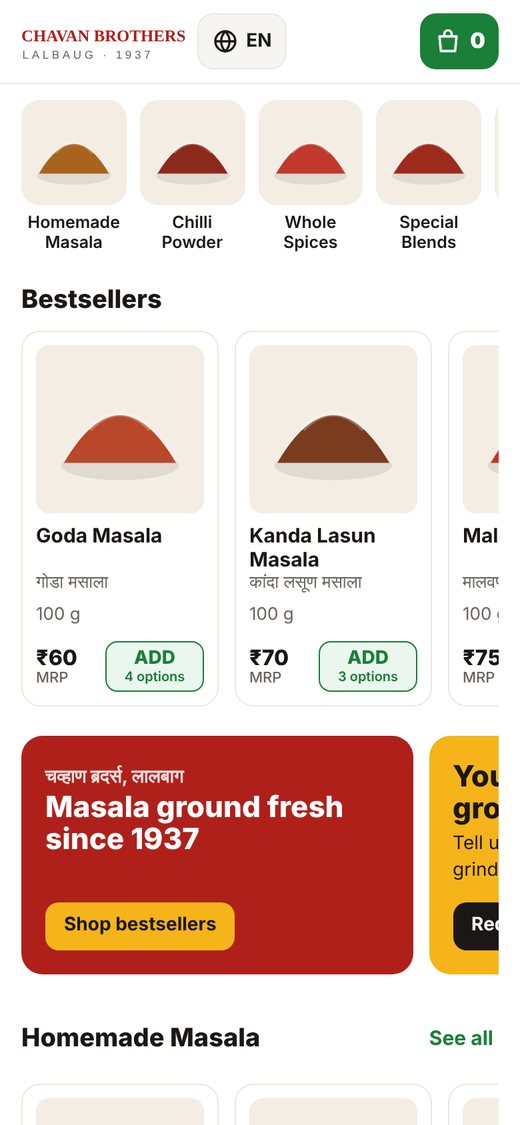
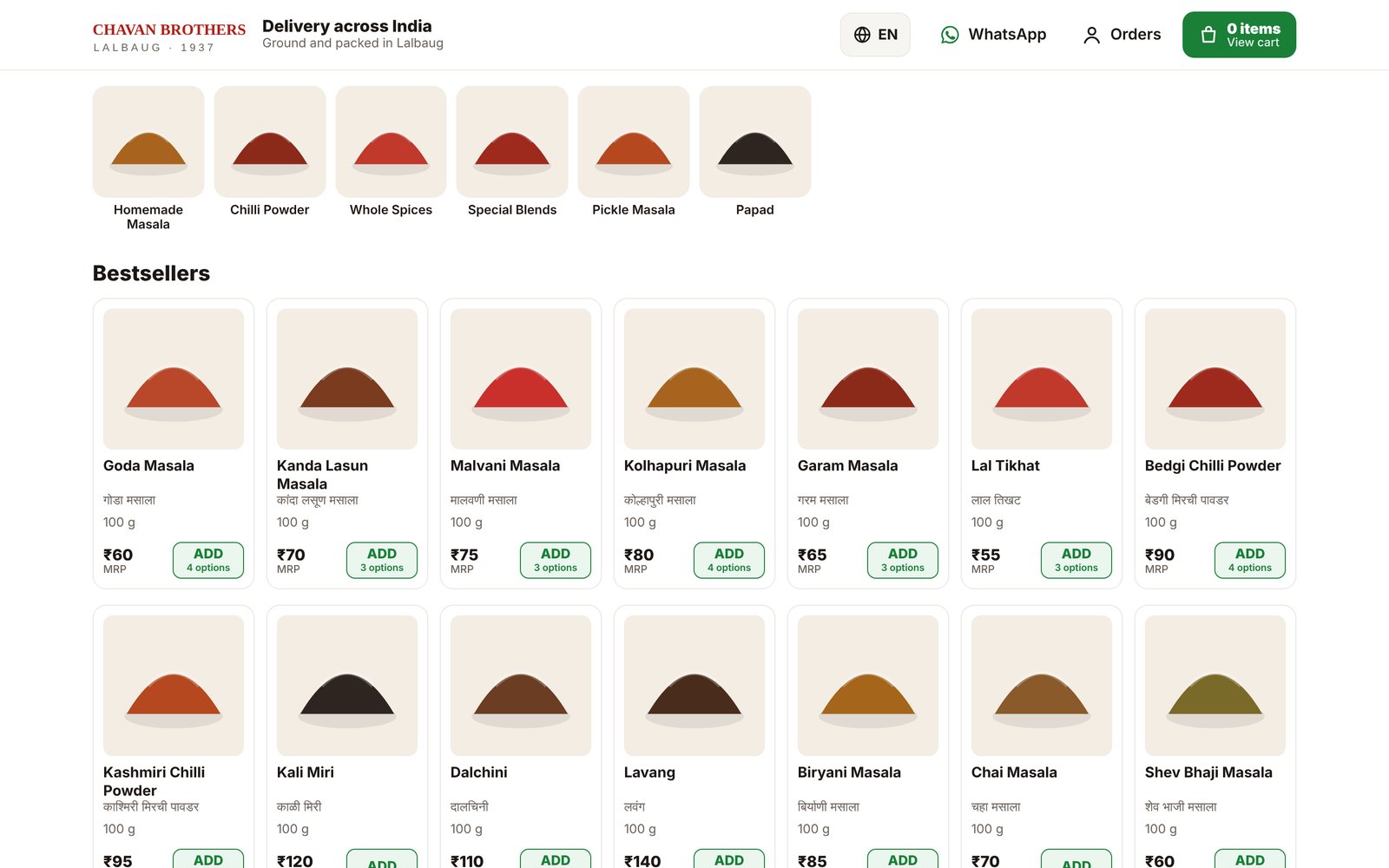
Everything a shopper needs is on the first screen: categories, bestsellers, price and pack size, and an ADD button. Every category then follows as its own row with every product in it.

chavanbrothers.com/test-quick/
Chavan Brothers quick-commerce store on desktop
Desktop: category grid, bestsellers, MRP and pack size on every card. Test build shown with sample products and placeholder photos.

One tap to cart

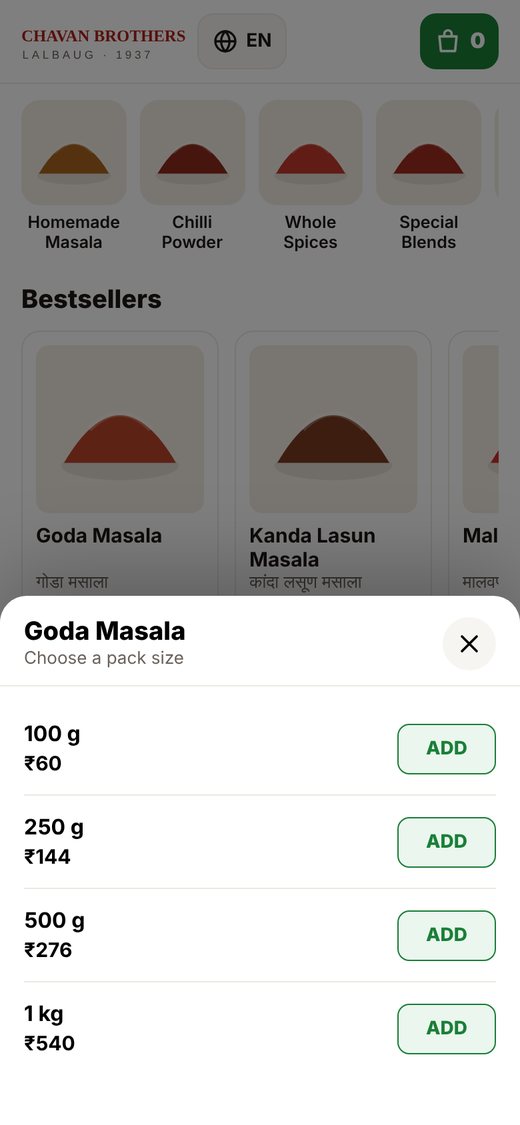
ADD calls the site's existing add-to-cart API. Products with several sizes open a pack-size sheet. A sticky cart bar keeps the total in view.

Login without leaving

If a shopper isn't logged in, ADD opens an OTP sheet on the same page, using the same login APIs as the live site.

Honest answers

Delivery rates, payment and returns copy was checked line by line against the real checkout code, and wrong claims were removed.

08 Designed for the phone first

Built for one thumb on a 4G connection


Chavan Brothers store home on a phone
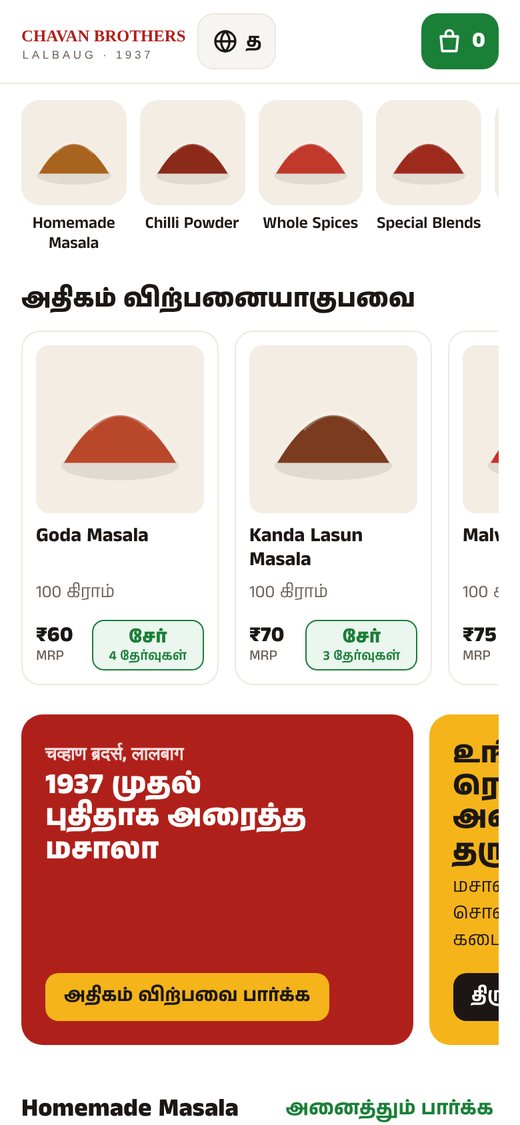
Home on a phone: categories scroll sideways, product rows below.
Pack-size sheet on a phone
Pack-size sheet: every size with its MRP, added in one tap.
Language picker on a phone
Language picker: 11 languages, each shown in its own script.

Mobile details that matter

  • Touch targets of 44 px or more
  • No sideways page scrolling at any width from 320 px up
  • Header adapts so long Tamil or Malayalam words never overflow
  • Sheets slide up from the bottom, like a native app

Tested on 10 screen widths

320, 360, 390, 414, 768, 820, 1024, 1280, 1440 and 1920 px, from small Android phones to large desktop monitors, in every language. That is 110 combinations, all passing with no overflow and no script errors.

09 Multilingual commerce

Speaking the customer's language, literally


Most Indian online stores are English only. For a brand whose customers think about food in Marathi, Hindi or Tamil, that is a barrier at the exact moment of buying.

EnglishDefault
हिन्दीHindi
मराठीMarathi
ગુજરાતીGujarati
ಕನ್ನಡKannada
தமிழ்Tamil
తెలుగుTelugu
বাংলাBengali
മലയാളംMalayalam
ਪੰਜਾਬੀPunjabi
ଓଡ଼ିଆOdia
+ GoogleAny other language
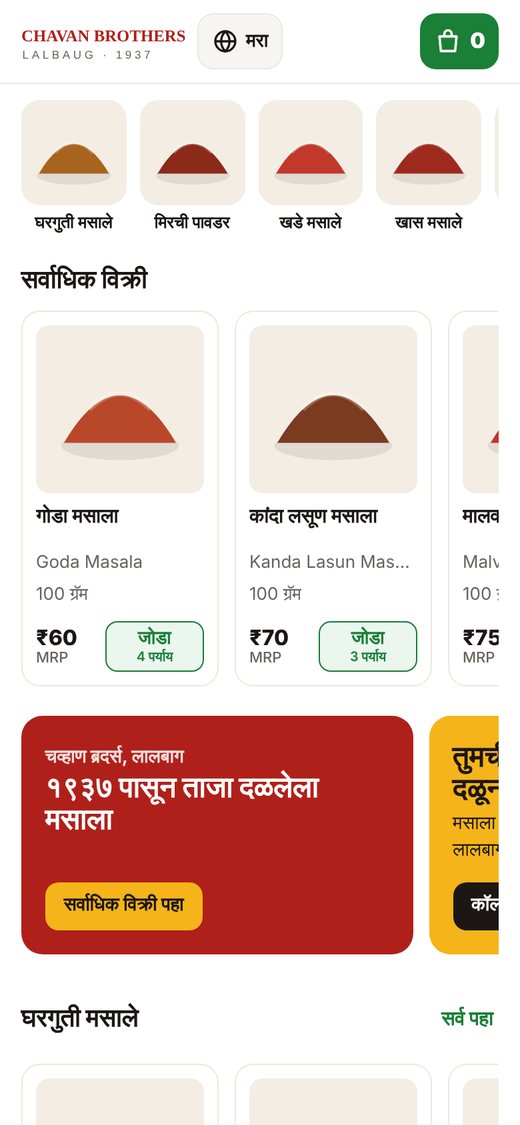
Store in Marathi on a phone
Marathi: page text and product names from the database.
Store in Tamil on a phone
Tamil: page text translated, product names in English.

How it works

  • Page text is translated by hand: about 85 phrases per language on the store, plus the About page.
  • Product and category names come from the database. Marathi uses the Marathi names the shop already maintains, and other languages show the English name.
  • Each script loads its own font only when chosen, so English visitors download nothing extra.
  • The phone's language is detected on the first visit, and the choice is remembered.
  • Google Translate loads only when “More languages” is tapped.
  • No database or server changes were needed.
10 Brand storytelling

Turning 89 years of history into a reason to buy


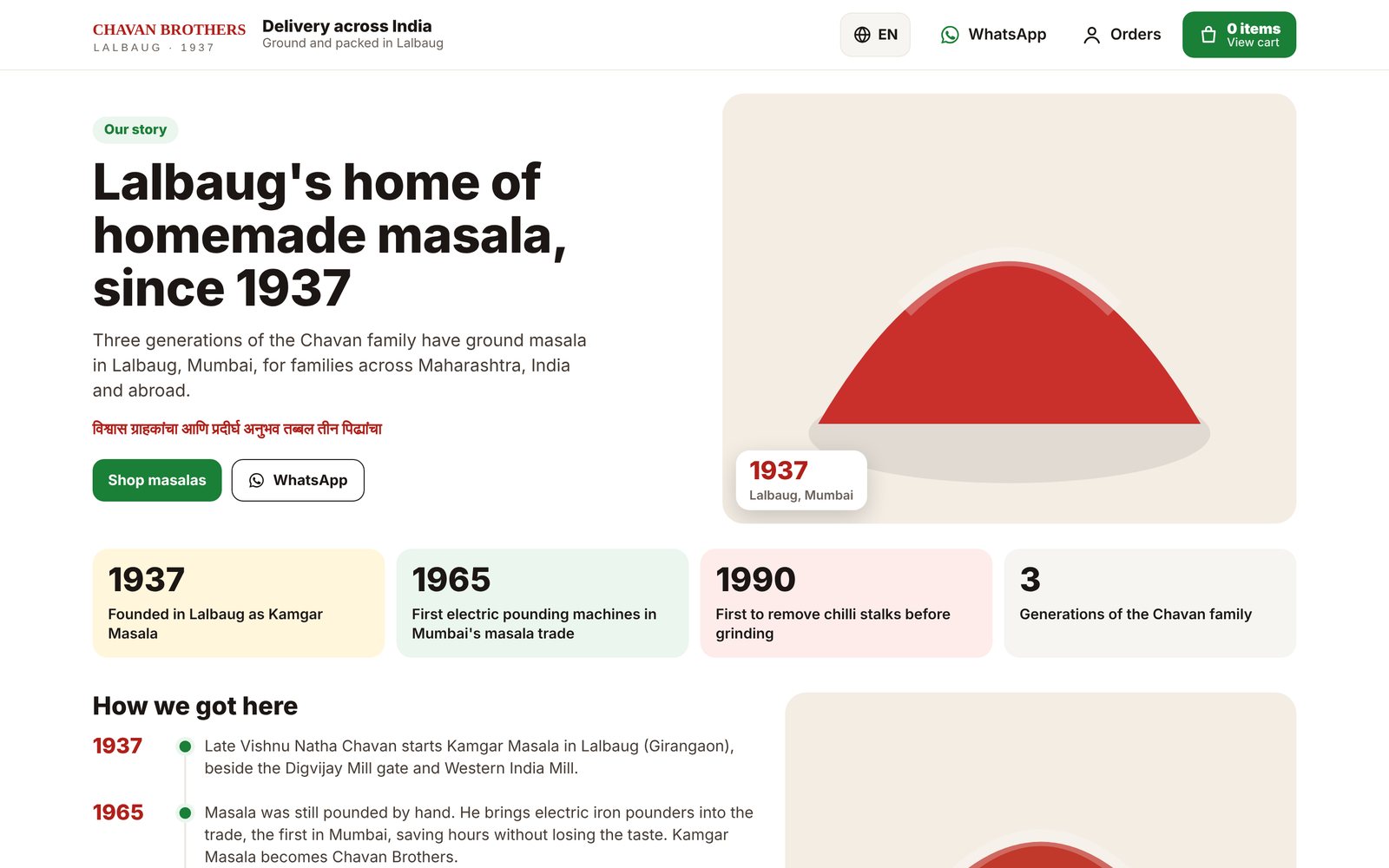
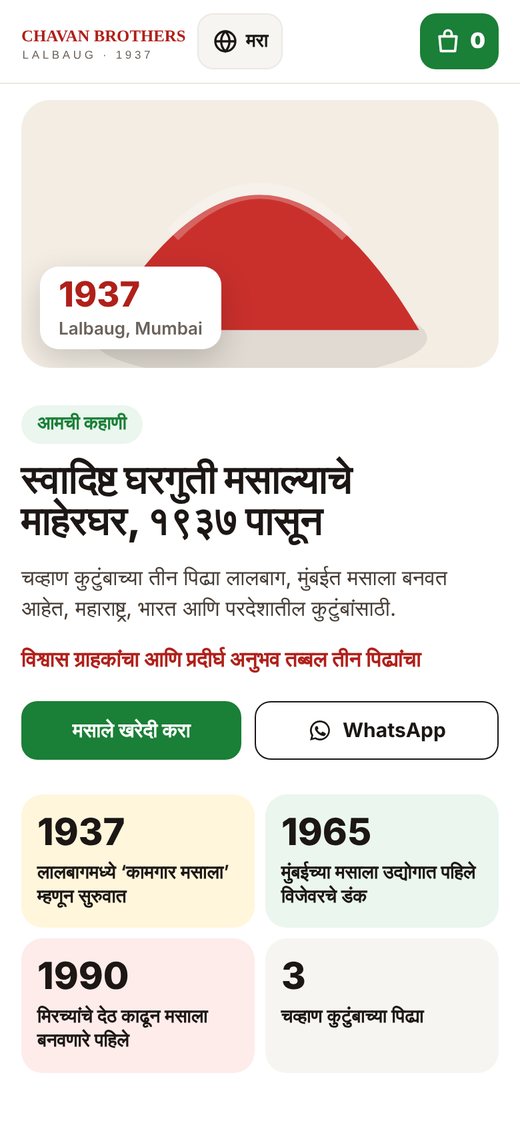
The new About page tells the 1937 story as a timeline, explains the name “Kamgar Masala”, shows the shop's own product photos and ends with a clear path back to the store. It is in the same design and the same 11 languages.

chavanbrothers.com/test-about/
Chavan Brothers About page on desktop
About page on desktop. Coloured boxes stand in for the shop's photos, which load on the live server.
About page in Marathi on a phone
The same page in Marathi on a phone.

Story first

Key dates (1937, 1965, 1990) up front, because heritage is the brand's strongest selling point.

Visit or buy

Address, hours, map directions, both phone numbers, WhatsApp and email in one block.

Content checked

Facts come from the existing site in English and Marathi. We flagged a wrong gallery caption for the client to correct.

11 Engineering

“New look, same logic”, in practice


The zero-change principle

  • Standalone pages. The new templates don't extend the live site's base layout, so nothing on the live site can change.
  • Additive code only. New view functions were added at the end of the existing views file. No existing function was edited.
  • Same APIs. Add to cart, OTP login and the enquiry form call the live site's existing endpoints, so orders, carts and leads land in the same tables.
  • Paste-proof. Each new function imports what it needs, so it still works if the shop's team copies just that block onto the server.
  • Built-in setup check. Each page carries a version number and shows a red banner if the server code and page are out of step.

Fact-checking the copy against the code

We tested every customer-facing claim against the source code. Two examples: delivery is charged per started kilogram based on the billing state, and the payment-method fee described on the old FAQ never actually applies at checkout. The new pages say only what the system does.

Performance

TechniqueEffect
Fetch only needed columnsSmaller queries for the product list
Two bulk queries for all pack sizes and cart flagsNo per-product database calls
Cards filled on the serverPrices visible before any script runs
Off-screen sections deferredBrowser lays out only what is near the screen
Fonts per language, on demandNo extra download for English visitors
10database queries for the whole store page, measured with a 300-product test catalogue
47 KBcompressed page size for that 300-product catalogue

Measured on a test server with sample data. Live figures depend on the real catalogue and hosting.

12 Outcomes

What the business has now


DeliverableValue to Chavan Brothers
Codebase guideA written map of all 12 modules, the order and payment flows, and 14 prioritised bugs and risks. Future developers can work safely from day one.
Quick-commerce store (/test-quick/)Every product and price on the homepage, one-tap add to cart, inline OTP login, sticky cart. Running on the live server and confirmed working by the client.
11-language front endHand-translated store and About page, plus Google Translate for any other language.
Speed fixesA fixed number of database queries regardless of catalogue size, and cards that appear before scripts load.
About page (/test-about/)The 1937 story as a sales tool, in the new design and all 11 languages.
Alternative design (/test-home/)A brand-led option kept for comparison and future A/B testing.
Install kitPaste-in code, step-by-step install notes and server tips (for example the Apache locale fix for non-English text in error pages).
Mobile app planA Flutter plan for Android and iPhone that keeps checkout and payment on the proven web flow, plus a store-publishing checklist.

Business results we are tracking

The new pages are being piloted alongside the live site. We will measure these with the site's existing Google Analytics and order data, comparing the old and new pages:

Mobile speed

Load time and PageSpeed score

Add-to-cart rate

Share of visits with an ADD tap

Conversion

Visits that end in a paid order

Language use

Share of visitors who switch language

Bounce rate

Visitors leaving from the first page

Orders & enquiries

Online orders, call-backs, WhatsApp chats

13 What's next

Roadmap


  1. 1Go live

    Switch the homepage and About page to the new design once pilot numbers confirm the gain.

  2. 2Harden

    Strengthen login security and fix the logged issues, such as heavy-parcel delivery and leftover cart rows.

  3. 3Faster images

    Serve resized product thumbnails so phones download a fraction of the image data.

  4. 4Mobile app

    Flutter app for Android and iPhone: native catalogue, the existing web checkout, push notifications.

14 Lessons

What we'd tell any heritage business


1. You don't need a rebuild to modernise

A careful audit showed the existing platform was sound. A new front end on the same logic delivered the visible change at a fraction of the risk and cost.

2. Test beside the live site

Parallel test pages let the owner use the new store on real phones with real data before a single customer sees it.

3. Language is a conversion feature

For regional food brands, the customer's mother tongue is part of the product, not a translation afterthought.

4. Let the code check the copy

Reading the checkout code caught FAQ promises the system didn't keep. Accurate copy builds trust at the moment of payment.

In one line

An 89-year-old Lalbaug masala house now has a fast, multilingual, phone-first store and a documented platform, built on the system it already trusted, with no change to how it bills, prices or gets paid.

Free consultation

Running a heritage business on an old website?

Talk to JMDA Analytic about a no-risk modernisation, starting with an audit of what you already have.

Chavan Brothers names, history and photographs belong to Chavan Brothers. Screens show test builds with sample product data.

Call WhatsApp Get Quote